 sklep@ccy.pl
 +48 514 563 619


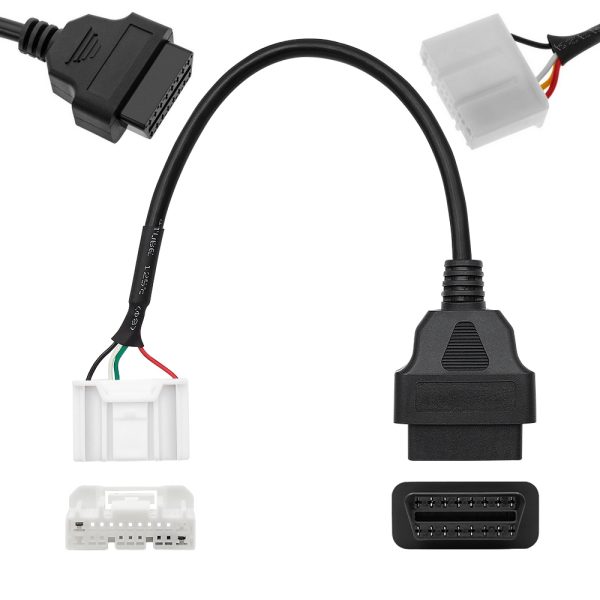
Adapter Tesla 20 pin - model S, X - 2016+
GTIN: 5908258866971
This OBDII adapter for the 20-pin connector is compatible with Model X and Model S produced from 09/2015 to 09/2021.
This adapter cable is compatible with applications such as "Scan My Tesla" and works well with (USB/WiFi/Bluetooth) OBD2 scanners and OBDII code readers, including OBDLink LX/MX+ and Vlinker MC, as well as others.
Before deciding to purchase, it is worth checking whether the diagnostic socket in your vehicle is compatible with the OBD2 / 20-pin adapter designed for Tesla Model S and Tesla X.
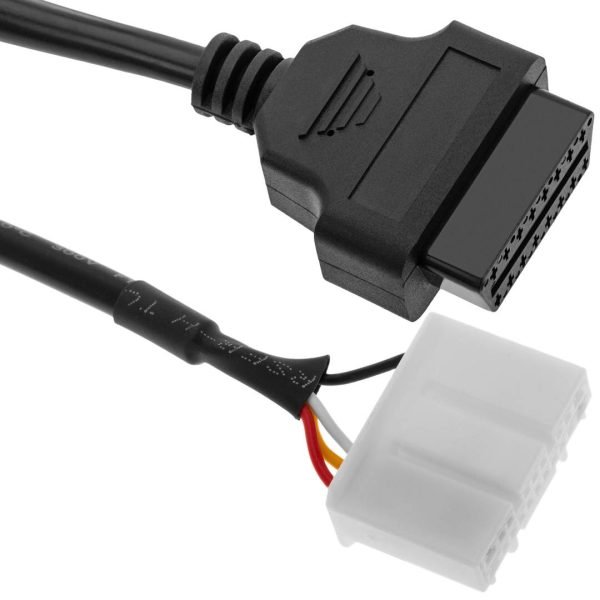
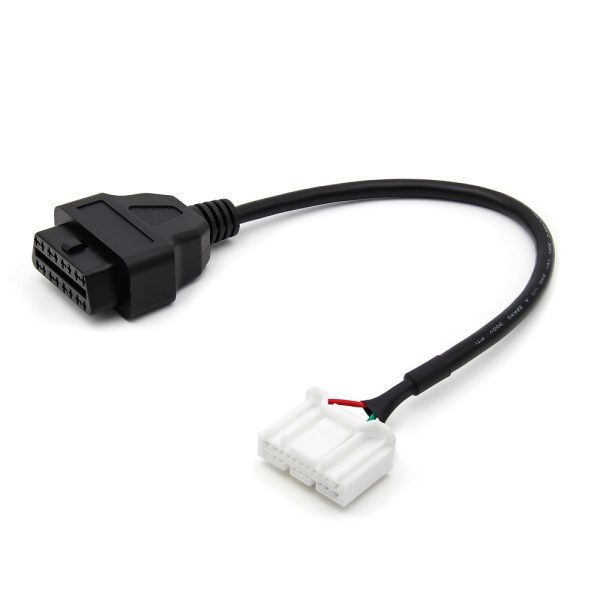
This 20-pin OBDII adapter has been specifically tailored for Tesla Model S and X vehicles, allowing the connection of an OBD2 Diagnostic Interface to the socket in the car. This will facilitate monitoring and diagnosing the condition of your vehicle.
Additional Features and Requirements
- The adapter has a wired design; it is not a standalone scanner and does not include diagnostic software.
- It does not perform active protocol conversion or extend the functionality of the connected device.
- A reader that supports the signals provided by the car and software adapted for Tesla data is required to read the data.
- The adapter itself does not require driver installation; any drivers and system requirements pertain to the interface and application used.
- The adapter should not be considered a replacement for factory Tesla Toolbox service tools.
Capabilities
Using a compatible reader and application, you can access selected information if the car provides it through the utilized connection point:
Temperatures of the traction battery and selected components of the powertrain.
Voltages, current intensities, and other electrical values of the battery pack.
State of charge, energy flow, and selected parameters of the charging process.
Selected drive and energy recovery parameters during braking.
Presentation and recording of data in real-time, as long as the used application allows it.
The range of available data depends on the version of the car, drivers, reader, and application. The adapter does not guarantee fault clearing, coding, calibration, or programming of controllers.
Important Information Regarding Selection
When choosing an adapter, it is essential to verify the actual appearance of the connector, its keying, pin assignments, and electrical compatibility, rather than relying solely on the year of the vehicle's first registration.
In vehicles with design changes around 2021, there may be different diagnostic solutions, so the model year designation does not guarantee compatibility with all later specimens.
The adapter is not intended for earlier installations requiring a Tesla 12 PIN adapter nor does it serve as a universal solution for Tesla Model 3 and Model Y.
It is also necessary to check the requirements of the specific version of the application and the reader used: the OBD2 socket alone does not automatically provide reading of Tesla-specific data through standard vehicle software.
Package Contents
- 1 × Tesla 20 PIN Diagnostic Adapter – OBD2 16 PIN.
Reviews
Delivery - cost and time
Orders weighing less than 2 kg are shipped via Polish Post Office. Once outside the borders of Poland, the package will be handled by a local company providing standard postal services.
Orders heavier than 2 kg are sent via courier service. The choice of courier company is tailored to each order and generally based on the lowest available price.
Price of international delivery :
Up to 2 kg - 39PLNMore than 2 kg - individual calculation
How to make an order
FIRST:
Order by email. Let me know what do you need. PRESS HERESECOND:
Order by our website or by EBAY.THIRD:
Only for companies and industries. Are you reseller? Let me know - we can offer very good prices. PRESS HERENewest products in the store


 CCYinterfaces
 CCYinterfejsy